My eSIM has no internet
Connect to trusted Wi-Fi if available. Check that the Japan eSIM is enabled and selected for mobile data. Follow your provider’s roaming and APN instructions; do not delete the eSIM while troubleshooting.
Do this now
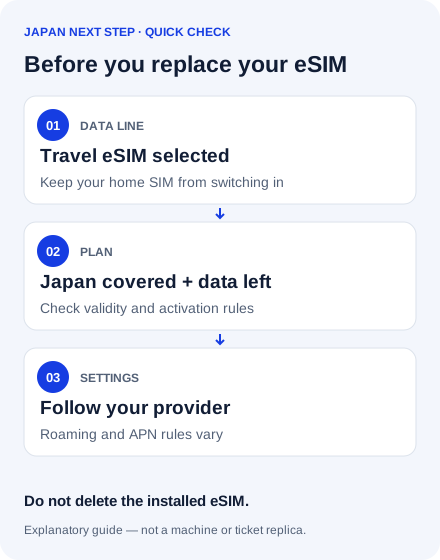
- Open mobile or cellular settings. Enable the travel eSIM and choose it as the data line. Disable automatic data switching if it could use your home SIM.
- Check that your plan covers Japan, has started and has data left. Turn on roaming for the travel eSIM only if its provider requires it.
- Compare APN and network settings with the provider’s instructions. Toggle airplane mode, then restart if needed. Contact the provider over Wi-Fi with the exact error.
Which situation are you in?
No signal at all
Check that the line is enabled, the device is supported and unlocked, and the plan is valid in Japan.
Signal bars, but no internet
Check the data line, remaining allowance, required roaming and APN.
It worked earlier
Check remaining data and validity, then provider outage notices. Keep the installed eSIM until support advises otherwise.
インターネットにつながりません。利用できるWi-Fiはありますか。
I can’t connect to the internet. Is Wi-Fi available here?
You can take a screenshot to keep this message handy.
Before you continue
Provider instructions differ. Do not enable roaming on your home line by mistake. Deleting an eSIM can require a replacement activation code. Avoid sharing an activation QR code publicly.
Related questions
Does every travel eSIM need roaming on?
No. Follow the instructions for your specific plan.
Should I buy another plan immediately?
First check settings and contact support. A new plan will not fix a locked or incompatible phone.
Still need a connection?
A new eSIM will not fix a locked or incompatible phone. Ask your current provider for help before paying again.
My phone supports eSIM, but my plan has expired
Compare a top-up with a replacement plan. Check Japan coverage, device compatibility, when validity starts and how much data you need for the rest of your trip. You will usually need an internet connection to install a new plan.
My phone cannot use a travel eSIM
If your phone is unlocked and has a compatible SIM slot, a physical SIM may be an option. Otherwise, consider a pocket Wi-Fi rental: check where and when you can collect it, battery life, the total rental price and how to return it. Do not assume delivery or collection is immediate.
For a pocket Wi-Fi option, check Japan Wireless collection and return options. Compare the total cost and timing before booking.
Affiliate link: we may earn a commission if you book.
I only need to get back to my hotel
Ask staff whether Wi-Fi is available. While connected, save your destination address and take screenshots of your route. Keep the Japanese address ready to show to staff.
Sources & checking
Source review: 17 September 2026 · Desk research, not a field test. Service conditions can change.